




In this article
You'll learn how to:
- auto-tag tracks with industry-standard descriptive tags
- use similarity search to find soundalikes instantly
- transcribe lyrics to make vocal tracks fully searchable
- generate instant instrumentals and a cappellas from any auto-tagged track
- understand how these tools work together
AI auto-tagging
Tagging a catalog properly is one of the most time-consuming parts of catalog management. Done well, it transforms how music gets found. Done inconsistently - or not at all - it leaves tracks effectively invisible.
DISCO's AI listens to every track you send it and applies descriptive, searchable tags automatically - genre, tempo, mood, instrumentation, vocals, BPM, and more. The tags are drawn from vocabulary used by thousands of music supervisors and sync professionals across the DISCO ecosystem, so they reflect how music is actually searched and briefed in the industry.
The result is a catalog where tracks are searchable even before anyone on your team has had a chance to listen.

A few things worth knowing about how auto-tagging works:
- tracks can be sent to the auto-tagger manually by dragging them into the Auto-tagged tracks area, or set up to tag automatically on upload
- once auto-tagged, a track is permanently connected to the AI and will receive improved tags as the model develops
- the AI will never overwrite manual tags you have added, and will never re-add a tag you have deliberately removed
- lyrical theme tags are only added if lyrics are present in the track metadata
- identical audio is recognized instantly, so duplicate tracks do not count toward your quota
To remove auto-tags from a track entirely, you will need to either delete the track or contact DISCO Support - removing a track from the Auto-tagged tracks area does not remove the tags or reduce your quota.
Similarity Search
A brief lands with a reference track link and a tight deadline. You have a catalog of thousands. Without similarity search, you are working from memory, metadata, and previous searches. With it, you paste a link and get results in seconds.
"Similarity Search has given us a deeper understanding of our music catalog and we've stumbled upon some hidden gems we may have otherwise missed." — Heather Boyd, Believe
Paste a reference link into the DISCO search bar - from Spotify, Apple Music, YouTube, or a track already in your DISCO - and get back the tracks in your catalog that sound most like it, ranked from most to least similar.

You can also trigger a similarity search directly from any track already in your library. Click on the track, open the Similar sounding tracks tab in the panel to the right that appears, and DISCO returns the closest matches without you needing to leave the track you are looking at.
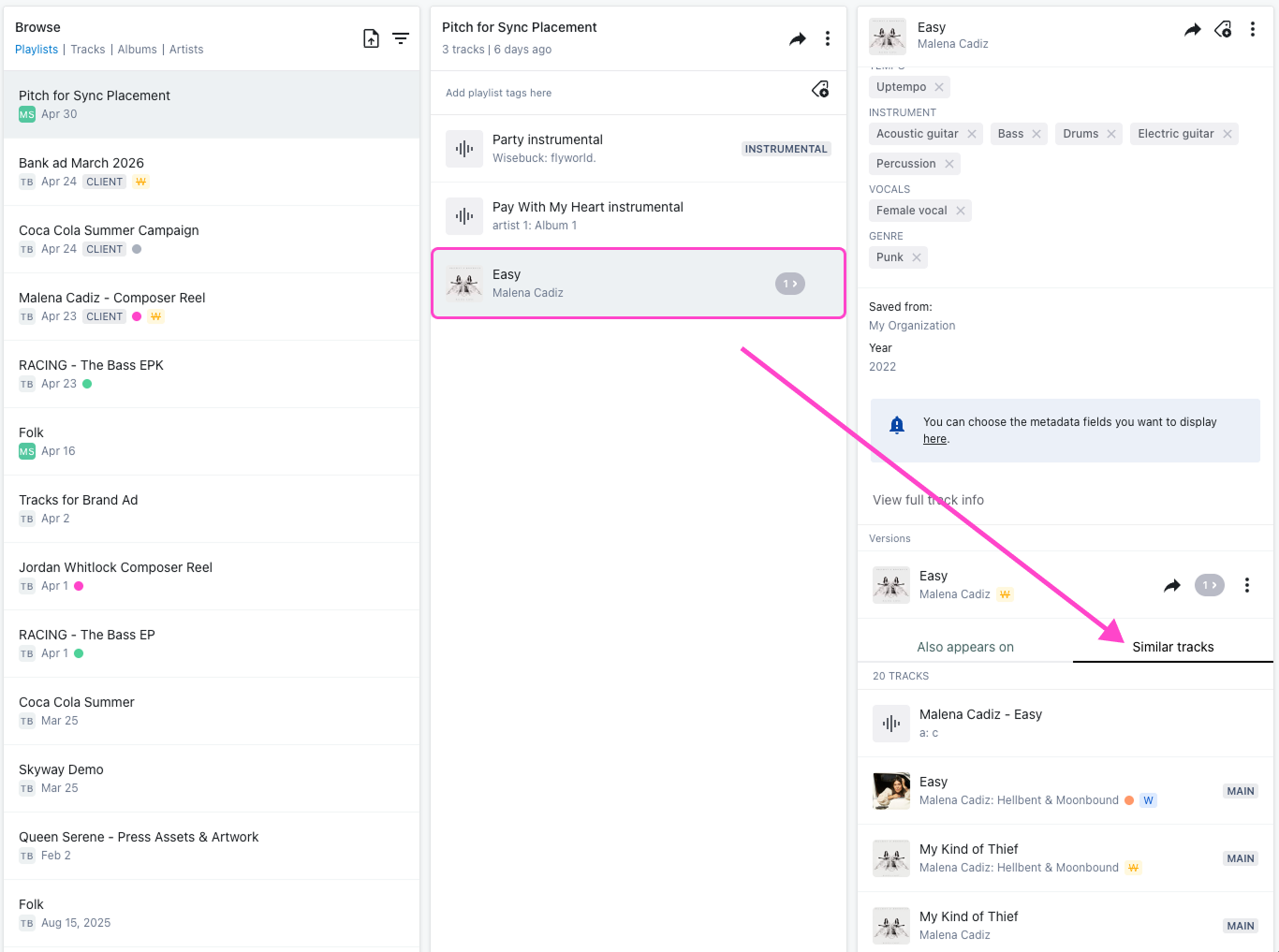
The analysis is purely audio-based. Tags, metadata, and track names play no role - the AI compares the actual sound. That is what makes it useful for surfacing catalog you had forgotten existed, or finding options for a brief that does not fit neatly into a genre or mood.
Similarity search works across auto-tagged tracks, so the more of your catalog is tagged, the better and broader the results.
Lyric transcription
A music supervisor searching for a song about loss, or one that mentions a specific word or phrase, can only find it if the lyrics are somewhere searchable. For most catalogs, they are not.
DISCO can listen to a track and write out the lyrics automatically - no manual entry, no copy-pasting from a lyric site. Once transcribed, lyrics are saved to the track's metadata and become fully searchable inside your DISCO. This opens up an entire new dimension of discovery for catalogs currently missing lyrics on their tracks.
To transcribe a track, open the Track Info editor, select the Lyrics tab, and click Transcribe. A confidence rating helps flag anything worth checking before you save. You can review and correct the transcription before saving it.

Lyric transcription is available across plans with different limits:
- Artist plan: unlimited transcription with or without Discovery Suite
- Plus plan: 20 tracks
- Pro plan: 20 tracks, or unlimited with Discovery Suite
- Enterprise: 20 tracks, or unlimited with Discovery Suite
Instant instrumentals and a cappellas
A sync opportunity lands. The brief specifies no vocals. You have the perfect track - but only the full vocal version. Without an instrumental ready, you are either chasing a producer or losing the placement.
DISCO's AI generates a clean instrumental from any auto-tagged vocal track in under a minute. The new version appears nested directly under the original in your library, metadata copied across, ready to pitch immediately. A cappella generation works the same way - a vocal-only version in under a minute, ready for remixers, advertising teams, or any brief that needs it.
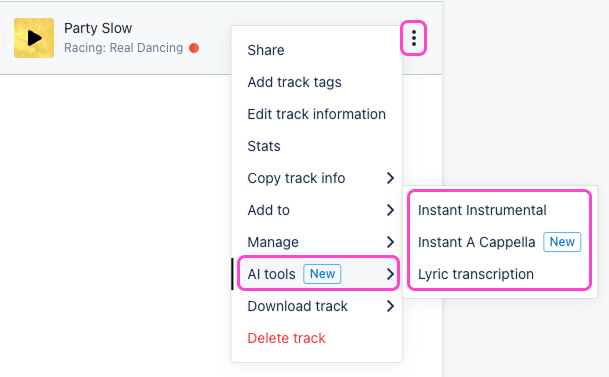
To generate either version, open the track menu, navigate to AI tools, and select Instant Instrumental or Instant A Cappella. The generated version appears nested under the main track and can be added to playlists or shared straight away.

Wrap up
DISCO's AI tools reduce the manual overhead of catalog management so your team can spend time on the work that actually needs a human - the relationships, the pitches, the creative decisions. The more of your catalog runs through these tools, the more useful and discoverable it becomes over time.